
To decide how to integrate CRM and ERP, agree which system may change each field and what happens when a transfer fails. Start with one handoff, such as an accepted quote becoming an order. Name the owner of the information before choosing a connector.
A CRM supports customer relationships and sales work. An ERP supports operational and financial processes. Their functions overlap, so your team's process must determine where each value is maintained. If you are still choosing the CRM itself, use our custom CRM or ready-made software comparison first.

How to integrate CRM and ERP: map one handoff
Choose a business event, identify its approved inputs and describe what the receiving team must be able to do next.
Trigger and destination
Write a testable statement: "When a quote is accepted and the required checks pass, create an ERP order and return its reference to CRM." Decide whether acceptance alone is sufficient or another person must release the order.
List the required fields, the destination record and the person responsible for each decision. Include amendments and cancellations. A changed quote needs an agreed route after an order has already been created.
Keep document reading separate from the system handoff. Our document and invoice automation overview explains how to establish the checked information that enters a workflow.
Interface constraints
A connector demonstration only answers part of how to integrate CRM and ERP. Check the actual product versions and licence plans, supported fields, access permissions, request limits and test environment. An API is an interface through which software exchanges requests; its existence alone does not establish that the required operation is supported.
Ask the supplier to demonstrate the complete handoff through the proposed interface. Microsoft's Sales integration documentation shows that mappings and transfer directions differ between record types. Your design needs the same level of precision.
Give each field an authoritative owner
For each important field, name the system allowed to change it, the receiving system's permissions and the person who resolves a disagreement.
Customer, order and invoice ownership
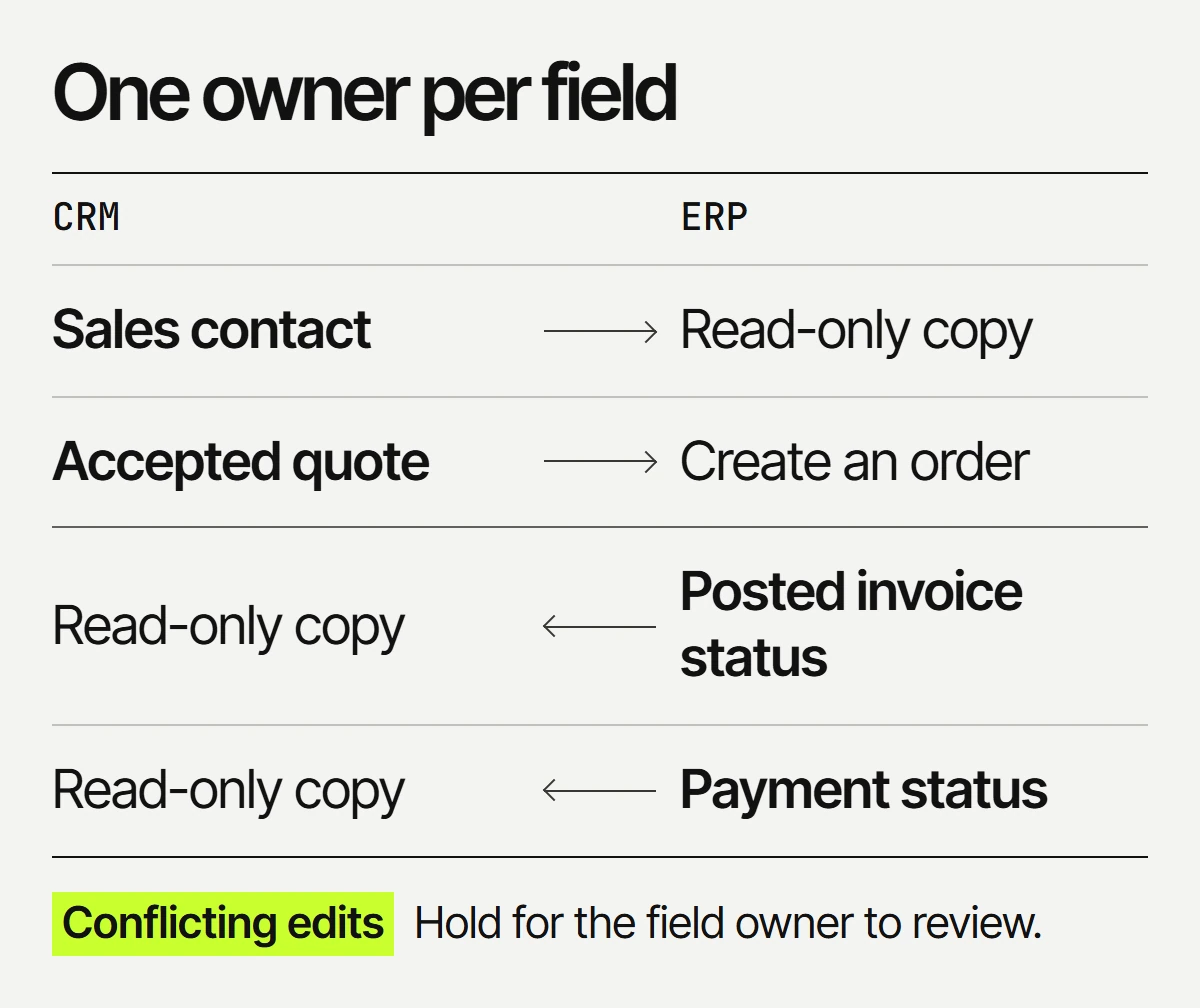
Customer data integration should give each team the information it needs. That does not require both systems to edit every value. The "source of truth" is the authoritative source for the particular field or decision.
Use this example as a workshop starting point. Finance and operations must approve the actual assignments for your process.
| Information | Example authoritative source | Receiving system's role | Decision to agree |
| Sales contact | CRM | ERP displays a copy | Who corrects the contact? |
| Accepted quote | CRM | ERP creates an order | Which approval releases it? |
| Customer account code | ERP | CRM retains the reference | How are existing accounts matched? |
| Posted invoice status | ERP | CRM displays a summary | Which roles may see it? |
| Payment status | ERP or accounting | CRM displays a summary | How old may the copy be? |

Identifiers and field rules
Keep a stable link between the two systems' record identifiers. Matching on a company name alone needs a review rule because names can change or resemble one another. Define how to handle duplicates, merged accounts and deleted records.
For each mapped field, record its format, allowed values and required status. Check currency, decimal precision, time zones and the difference between billing and delivery addresses. A blank value needs a defined meaning: preserve the destination, clear it or hold for review.
Microsoft's mapping guidance describes field directions, transformations and conflict strategies. Treat defaults as settings to review against your approved map.
Define transfer timing and failed-record recovery
Choose a direction and acceptable delay for each flow. Separate records waiting to transfer from records confirmed in the destination.
One-way and two-way updates
ERP integration can use different directions for different fields. Sales might send accepted quotes while finance returns invoice status. Agree how quickly each update must arrive and how users recognise an outdated copy.
For a field editable in both systems, specify what wins when both versions change. Hold an unresolved conflict for the named owner instead of letting arrival order decide. Record the relevant identifiers and outcome in a restricted activity history.
A transfer with an uncertain result
Consider a test order accepted by ERP just before the connection drops. CRM receives no acknowledgement. Its correct state is "transfer unconfirmed" until the destination is checked.
Use a stable request reference and the destination's supported duplicate-prevention mechanism. A repeated request should resolve to the same order. If the interface cannot guarantee this, agree a lookup and manual recovery route before enabling automatic retries.
Microsoft's retry guidance distinguishes temporary faults from failures that another attempt cannot fix. Set bounded attempts and delays for retryable failures. A missing required field needs correction. Assign an owner to unresolved transfers and make the reason visible.
Where a handoff includes approval, retain that decision during recovery. Our invoice approval checklist covers the separate checks needed before a finance record advances.
Test the map before switching on live transfers
Test successful and failed handoffs with representative records. Agree who can pause transfers and how records will be reconciled after a problem.
Sandbox and acceptance checks
Start in a separate test environment with synthetic or redacted records. Exercise a valid order, duplicate submission, missing field, changed customer, simultaneous edit and interrupted acknowledgement. Test the permissions of ordinary users as well as the integration account.
Compare expected and actual records, references and statuses. A connection returning success is insufficient if it created the wrong order. Have the people responsible for sales and finance accept the cases relevant to their work.
Cutover, rollback and monitoring
Before cutover, agree which records are included, when existing records are matched and what prevents old changes from being replayed. Define a stop condition and a named person who can pause the flow.
Keep a recovery plan for records already created. Disabling a connector does not undo a posted business transaction. Agree corrective steps with the system's responsible owner, then reconcile the affected references before resuming.
Monitor failed transfers, waiting records and the age of the oldest unresolved item. If you are planning how to integrate CRM and ERP, bring your record map to B41. Include the systems and versions, one redacted handoff and the person who can approve the ownership decisions.
Sources
Microsoft: Business Central and Dynamics 365 Sales integration. Checked 19 November 2026.
Microsoft: table and field mappings, directions and conflicts. Checked 19 November 2026.
Microsoft Azure Architecture Center: retry pattern. Checked 19 November 2026.
IBM: CRM integration and ERP connections. Checked 19 November 2026.
Salesforce: customer data integration. Checked 19 November 2026.